Every asset checked, every deadline met.
AptaKeep schedules maintenance and periodic inspections, guides technicians in the field from their phone and keeps the history of every asset: what was done, when, by whom and with what outcome.
- Runs in the browser, on phones, tablets and PCs
- Barcodes read with the phone camera, no dedicated scanners
- PDF logs ready to print or show
When maintenance lives in spreadsheets, something always slips
Assets grow, sites multiply, technicians change. Deadlines don't.
Scattered deadlines
Spreadsheets, calendars, notes: periodic inspections depend on someone's memory.
Assets nobody can find
Power tools, hoists, measuring instruments move between sites, vans and job sites, and nobody knows where they are.
Logs rebuilt by hand
When you need to prove an inspection was done, the history has to be pieced together by hand. If it exists at all.
How it works
From maintenance plan to signed log, in a single tool.
Today's round, ready to go
AptaKeep generates due tasks from your maintenance plans and shows them site by site. Technicians filter open, failed or resolved tasks, pick a horizon (30, 90 days…) and always know where to start.

Record the outcome on the spot
Passed, failed or resolved, with a note: the inspection is closed from the phone in front of the asset and lands in the history with date and operator.

Point at the label, find the asset
Barcodes are read with the phone camera: no scanners to buy. In a moment you have the asset and its upcoming tasks in front of you.

An ID card for every asset
Serial number, model, site and location (even a van), barcode, next and last maintenance. Photos and documents such as manuals and certificates stay attached to the asset.

Breakdowns and repairs, tracked
When something breaks, open a repair job, in-house or with an external service provider, with its work lines. While it is open, the asset's deadlines are suspended; if the repair fails, the asset is retired.

PDF logs, ready for audits
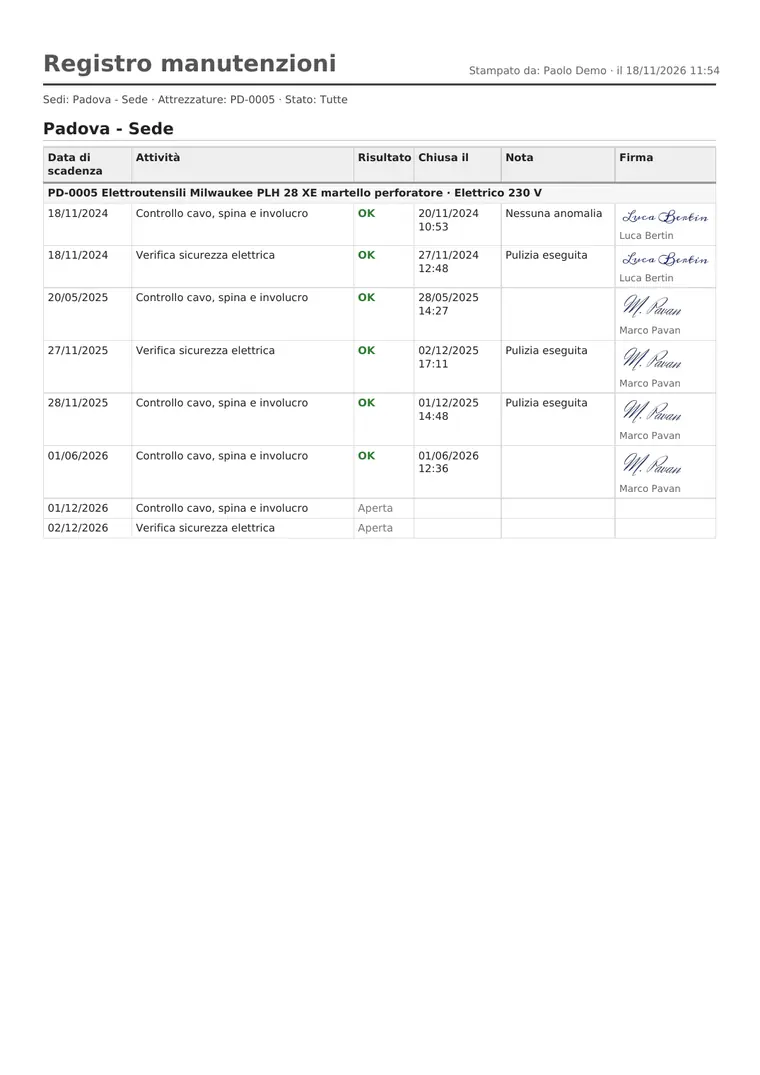
When someone asks to see your maintenance records, the log is one click away: by site or by single asset, with outcome, closing date and signature.
- Maintenance log by site or by asset
- Asset inventory by site
- Repair job sheet
Maintenance plans
Task lists with frequencies in months or years, linked to asset categories.
Multiple sites
Sites, warehouses and vans: assets and tasks are organised by site, and switching site takes one tap.
Roles and permissions
Who views, who executes, who administers: everyone sees and edits only what they should.
Nothing to install
Use it in the browser and add it to the home screen like an app. Light and dark theme.
See it in action
The introduction video and four everyday operations, recorded on the real app (Italian interface).
AptaKeep in one minute
Inspections and due dates, label scanning, photos and documents, faults and repairs: what AptaKeep does for teams managing equipment in the warehouse, in vans and on site.
With audio (Italian), 53 seconds.
Request a demoFor anyone whose equipment has to work
Wherever assets need regular checks, on one site or many.
- Electrical and plumbing contractors
- Workshops and maintenance providers
- Tool and equipment rental
- Construction companies
- Technical departments and facility management
- Companies with tool fleets across sites
Frequently asked questions
Do I need a barcode scanner?
No. Any phone camera will do: AptaKeep reads the barcode on the asset label.
Do I need to install anything?
No. AptaKeep runs in the browser on phones, tablets and PCs, and can be added to the home screen like an app.
Can I manage multiple sites and vans?
Yes. Every asset has a site and a location, which can also be a van or a warehouse. Tasks and logs can be filtered by site.
Who can see and edit the data?
Only authorised users, according to their role. Each company works in its own environment, separate from other customers.
What happens when an inspection fails?
The outcome stays in the history. If work is needed, you open a repair job, in-house or with an external provider, which suspends the asset's deadlines until it is closed.
Who is behind AptaKeep?
AptaKeep is developed by Aptagram S.r.l., a software company based in Vigonza (Padua, Italy) that builds business software and apps.
Let's see if AptaKeep fits
Tell us how many assets you manage and how you work today: we'll show you AptaKeep on your own cases and prepare a proposal.
Prefer to write directly? info@aptagram.com · +39 049 8597926